> For clean Markdown of any page, append .md to the page URL.
> For a complete documentation index, see https://docs.boundaryml.com/llms.txt.
> For AI client integration (Claude Code, Cursor, etc.), connect to the MCP server at https://docs.boundaryml.com/_mcp/server.
# Prompting in BAML
We recommend reading the [installation](/guide/installation-language/python) instructions first
BAML functions are special definitions that get converted into real code (Python, TS, etc) that calls LLMs. Think of them as a way to define AI-powered functions that are type-safe and easy to use in your application.
### What BAML Functions Actually Do
When you write a BAML function like this:
```rust BAML
function ExtractResume(resume_text: string) -> Resume {
client "openai-responses/gpt-5-mini"
// The prompt uses Jinja syntax.. more on this soon.
prompt #"
Extract info from this text.
{# special macro to print the output schema + instructions #}
{{ ctx.output_format }}
Resume:
---
{{ resume_text }}
---
"#
}
```
BAML converts it into code that:
1. Takes your input (`resume_text`)
2. Sends a request to OpenAI's GPT-4 API with your prompt.
3. Parses the JSON response into your `Resume` type
4. Returns a type-safe object you can use in your code
### Prompt Preview + seeing the CURL request
For maximum transparency, you can see the API request BAML makes to the LLM provider using the VSCode extension.
Below you can see the **Prompt Preview**, where you see the full rendered prompt (once you add a test case):
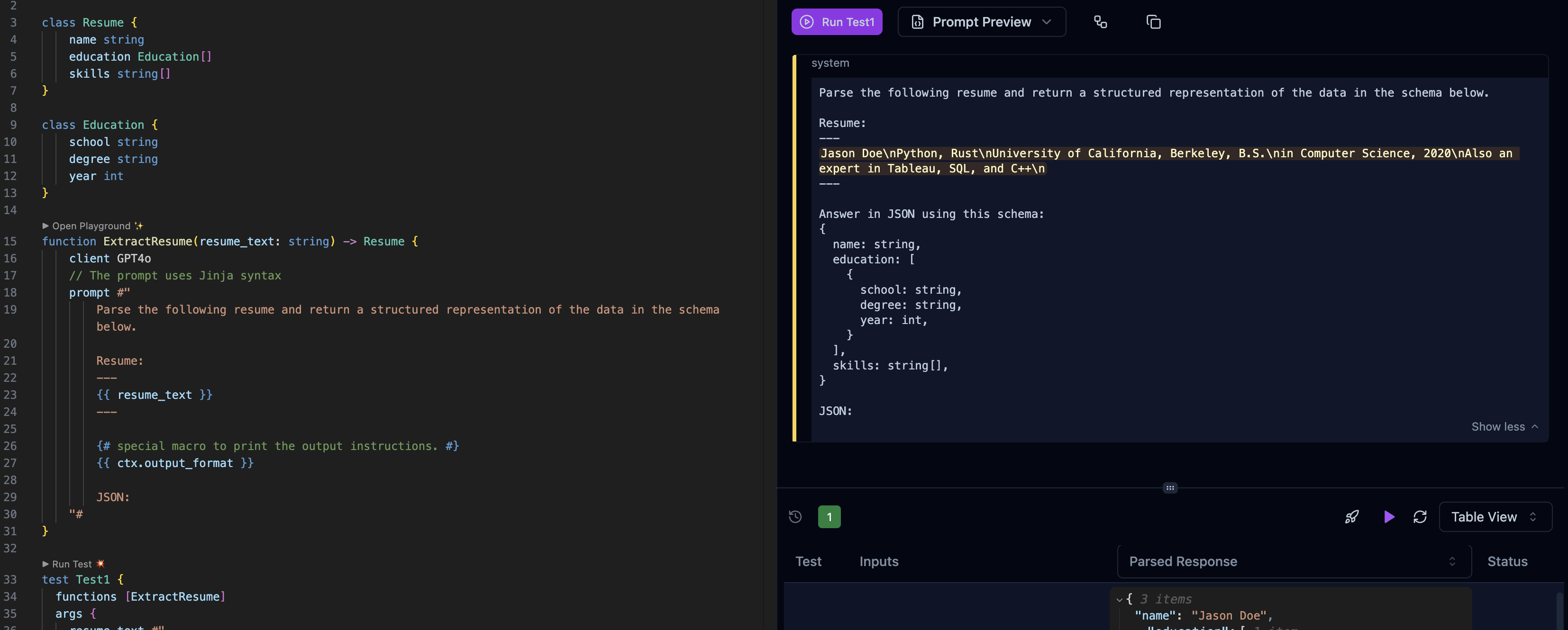 Note how the `{{ ctx.output_format }}` macro is replaced with the output schema instructions.
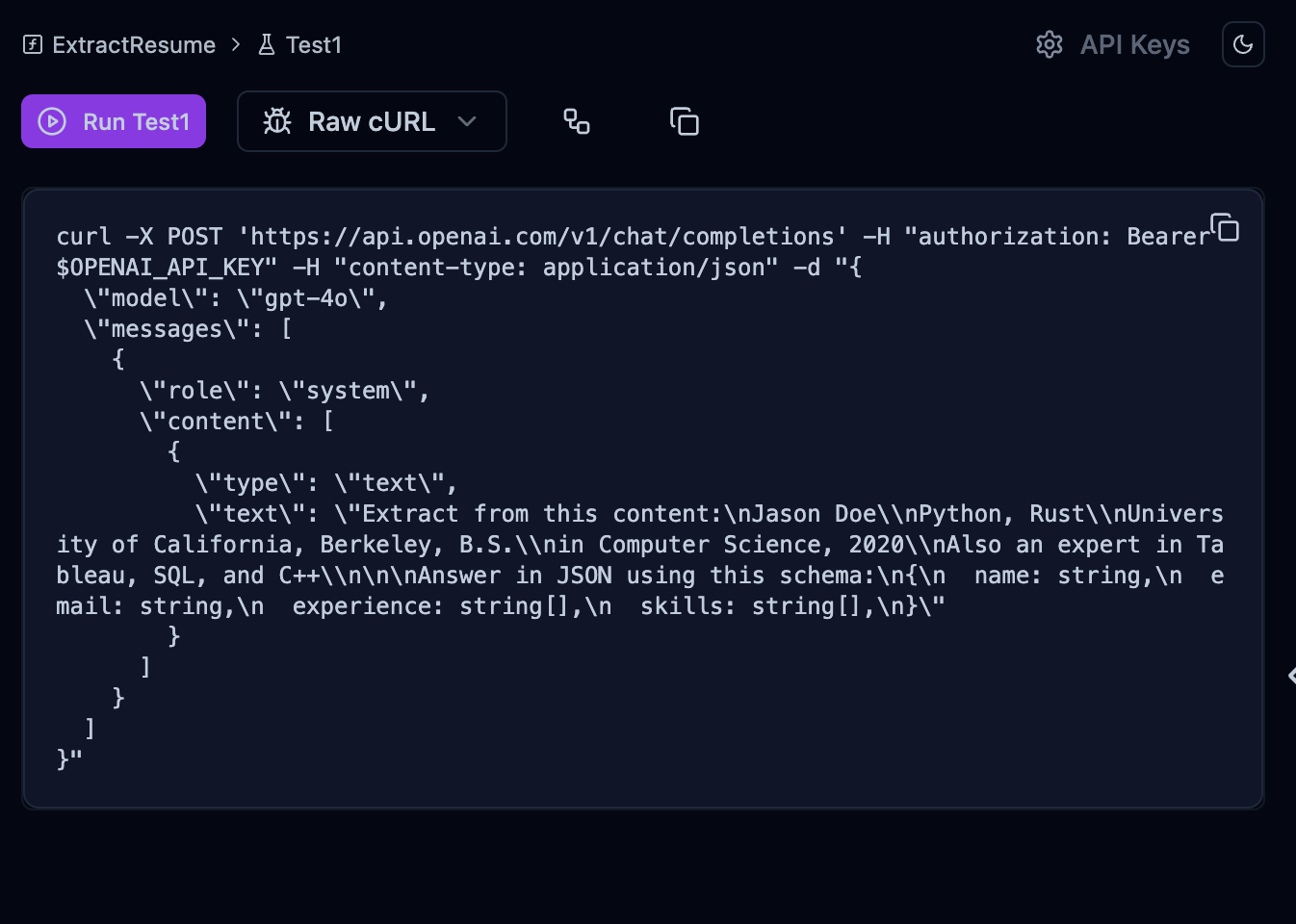
The Playground will also show you the **Raw CURL request** (switch from "Prompt Review" to "Raw cURL"):
Note how the `{{ ctx.output_format }}` macro is replaced with the output schema instructions.
The Playground will also show you the **Raw CURL request** (switch from "Prompt Review" to "Raw cURL"):
 Always include the `{{ ctx.output_format }}` macro in your prompt. This injects your output schema into the prompt, which helps the LLM output the right thing. You can also [customize what it prints](/ref/prompt-syntax/ctx-output-format).
One of our design philosophies is to never hide the prompt from you. You control and can always see the entire prompt.
## Calling the function
Recall that BAML will generate a `baml_client` directory in the language of your choice using the parameters in your [`generator`](/ref/baml/generator) config. This contains the function and types you defined.
Now we can call the function, which will make a request to the LLM and return the `Resume` object:
```python python
# Import the baml client (We call it `b` for short)
from baml_client import b
# Import the Resume type, which is now a Pydantic model!
from baml_client.types import Resume
def main():
resume_text = """Jason Doe\nPython, Rust\nUniversity of California, Berkeley, B.S.\nin Computer Science, 2020\nAlso an expert in Tableau, SQL, and C++\n"""
# this function comes from the autogenerated "baml_client".
# It calls the LLM you specified and handles the parsing.
resume = b.ExtractResume(resume_text)
# Fully type-checked and validated!
assert isinstance(resume, Resume)
```
```typescript typescript
import b from 'baml_client'
import { Resume } from 'baml_client/types'
async function main() {
const resume_text = `Jason Doe\nPython, Rust\nUniversity of California, Berkeley, B.S.\nin Computer Science, 2020\nAlso an expert in Tableau, SQL, and C++`
// this function comes from the autogenerated "baml_client".
// It calls the LLM you specified and handles the parsing.
const resume = await b.ExtractResume(resume_text)
// Fully type-checked and validated!
resume.name === 'Jason Doe'
if (resume instanceof Resume) {
console.log('resume is a Resume')
}
}
```
```go go
package main
import (
"context"
"fmt"
b "example.com/myproject/baml_client"
"example.com/myproject/baml_client/types"
)
func main() {
ctx := context.Background()
resumeText := `Jason Doe
Python, Rust
University of California, Berkeley, B.S.
in Computer Science, 2020
Also an expert in Tableau, SQL, and C++`
// this function comes from the autogenerated "baml_client".
// It calls the LLM you specified and handles the parsing.
resume, err := b.ExtractResume(ctx, resumeText, nil)
if err != nil {
fmt.Printf("Error: %v\n", err)
return
}
// Fully type-checked and validated!
fmt.Printf("Resume: %+v\n", resume)
}
```
```ruby ruby
require_relative "baml_client/client"
b = Baml.Client
# Note this is not async
res = b.TestFnNamedArgsSingleClass(
myArg: Baml::Types::Resume.new(
key: "key",
key_two: true,
key_three: 52,
)
)
```
```rust rust
use myproject::baml_client::sync_client::B;
use myproject::baml_client::types::*;
fn main() {
let resume_text = "Jason Doe\nPython, Rust\nUniversity of California, Berkeley, B.S.\nin Computer Science, 2020\nAlso an expert in Tableau, SQL, and C++\n";
// this function comes from the autogenerated "baml_client".
// It calls the LLM you specified and handles the parsing.
let resume = B.ExtractResume.call(resume_text).unwrap();
// Fully type-checked and validated!
println!("Resume: {:?}", resume);
}
```
Do not modify any code inside `baml_client`, as it's autogenerated.
## Next steps
Checkout [PromptFiddle](https://promptfiddle.com) to see various interactive BAML function examples or view the [example prompts](/examples)
Read the next guide to learn more about choosing different LLM providers and running tests in the VSCode extension.
Use any provider or open-source model
Test your functions in the VSCode extension
Define user or assistant roles in your prompts
Use function calling or tools in your prompts
Always include the `{{ ctx.output_format }}` macro in your prompt. This injects your output schema into the prompt, which helps the LLM output the right thing. You can also [customize what it prints](/ref/prompt-syntax/ctx-output-format).
One of our design philosophies is to never hide the prompt from you. You control and can always see the entire prompt.
## Calling the function
Recall that BAML will generate a `baml_client` directory in the language of your choice using the parameters in your [`generator`](/ref/baml/generator) config. This contains the function and types you defined.
Now we can call the function, which will make a request to the LLM and return the `Resume` object:
```python python
# Import the baml client (We call it `b` for short)
from baml_client import b
# Import the Resume type, which is now a Pydantic model!
from baml_client.types import Resume
def main():
resume_text = """Jason Doe\nPython, Rust\nUniversity of California, Berkeley, B.S.\nin Computer Science, 2020\nAlso an expert in Tableau, SQL, and C++\n"""
# this function comes from the autogenerated "baml_client".
# It calls the LLM you specified and handles the parsing.
resume = b.ExtractResume(resume_text)
# Fully type-checked and validated!
assert isinstance(resume, Resume)
```
```typescript typescript
import b from 'baml_client'
import { Resume } from 'baml_client/types'
async function main() {
const resume_text = `Jason Doe\nPython, Rust\nUniversity of California, Berkeley, B.S.\nin Computer Science, 2020\nAlso an expert in Tableau, SQL, and C++`
// this function comes from the autogenerated "baml_client".
// It calls the LLM you specified and handles the parsing.
const resume = await b.ExtractResume(resume_text)
// Fully type-checked and validated!
resume.name === 'Jason Doe'
if (resume instanceof Resume) {
console.log('resume is a Resume')
}
}
```
```go go
package main
import (
"context"
"fmt"
b "example.com/myproject/baml_client"
"example.com/myproject/baml_client/types"
)
func main() {
ctx := context.Background()
resumeText := `Jason Doe
Python, Rust
University of California, Berkeley, B.S.
in Computer Science, 2020
Also an expert in Tableau, SQL, and C++`
// this function comes from the autogenerated "baml_client".
// It calls the LLM you specified and handles the parsing.
resume, err := b.ExtractResume(ctx, resumeText, nil)
if err != nil {
fmt.Printf("Error: %v\n", err)
return
}
// Fully type-checked and validated!
fmt.Printf("Resume: %+v\n", resume)
}
```
```ruby ruby
require_relative "baml_client/client"
b = Baml.Client
# Note this is not async
res = b.TestFnNamedArgsSingleClass(
myArg: Baml::Types::Resume.new(
key: "key",
key_two: true,
key_three: 52,
)
)
```
```rust rust
use myproject::baml_client::sync_client::B;
use myproject::baml_client::types::*;
fn main() {
let resume_text = "Jason Doe\nPython, Rust\nUniversity of California, Berkeley, B.S.\nin Computer Science, 2020\nAlso an expert in Tableau, SQL, and C++\n";
// this function comes from the autogenerated "baml_client".
// It calls the LLM you specified and handles the parsing.
let resume = B.ExtractResume.call(resume_text).unwrap();
// Fully type-checked and validated!
println!("Resume: {:?}", resume);
}
```
Do not modify any code inside `baml_client`, as it's autogenerated.
## Next steps
Checkout [PromptFiddle](https://promptfiddle.com) to see various interactive BAML function examples or view the [example prompts](/examples)
Read the next guide to learn more about choosing different LLM providers and running tests in the VSCode extension.
Use any provider or open-source model
Test your functions in the VSCode extension
Define user or assistant roles in your prompts
Use function calling or tools in your prompts