> For clean Markdown of any page, append .md to the page URL.
> For a complete documentation index, see https://docs.boundaryml.com/llms.txt.
> For AI client integration (Claude Code, Cursor, etc.), connect to the MCP server at https://docs.boundaryml.com/_mcp/server.
# Boundary Studio
**Deprecation notice:** Boundary Studio v1 at `app.boundaryml.com` will be deprecated by **end of March 2026**. Please migrate to the new [Boundary Studio](https://studio.boundaryml.com) at `studio.boundaryml.com`.
## Getting Started
To enable observability with BAML, sign up for a [Boundary Studio](https://studio.boundaryml.com) account.
Once you've signed up, create a new project and get your API key. Then add the following environment variable before running your application:
```bash
export BOUNDARY_API_KEY=your_api_key_here
```
That's it — your BAML function calls will now be traced automatically.
## Dashboard
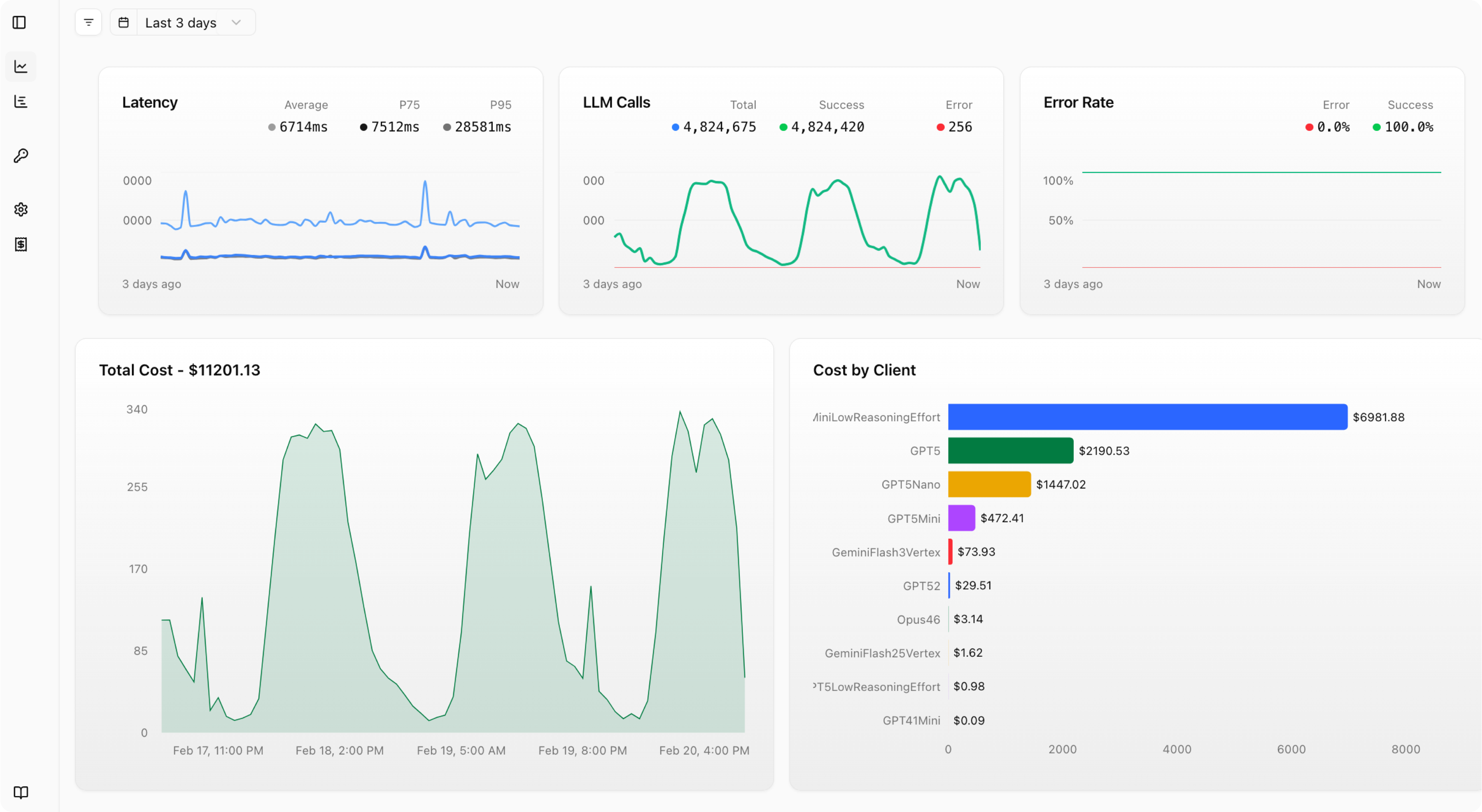
The dashboard gives you a high-level overview of your LLM usage across all your BAML functions
 ## Traces
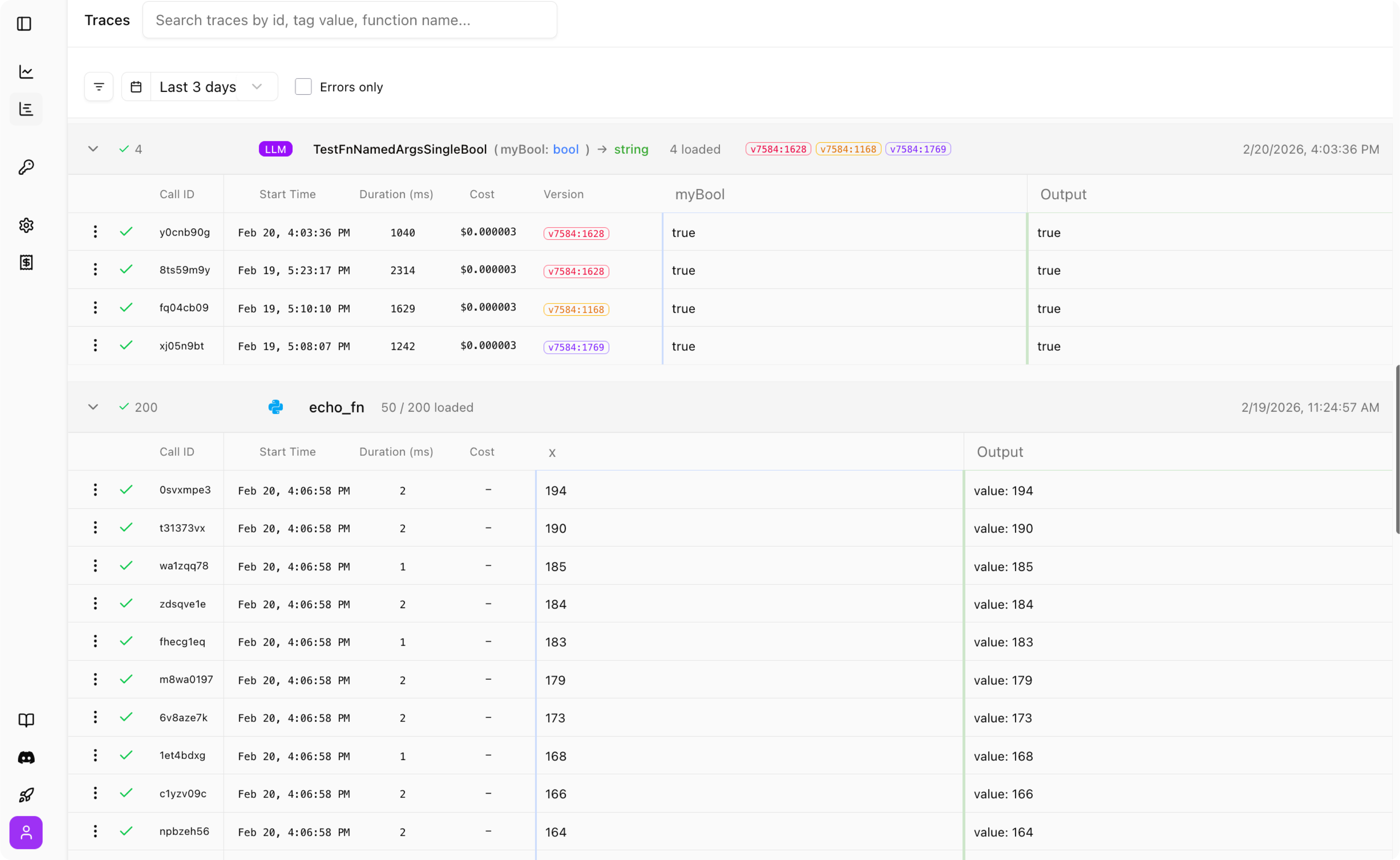
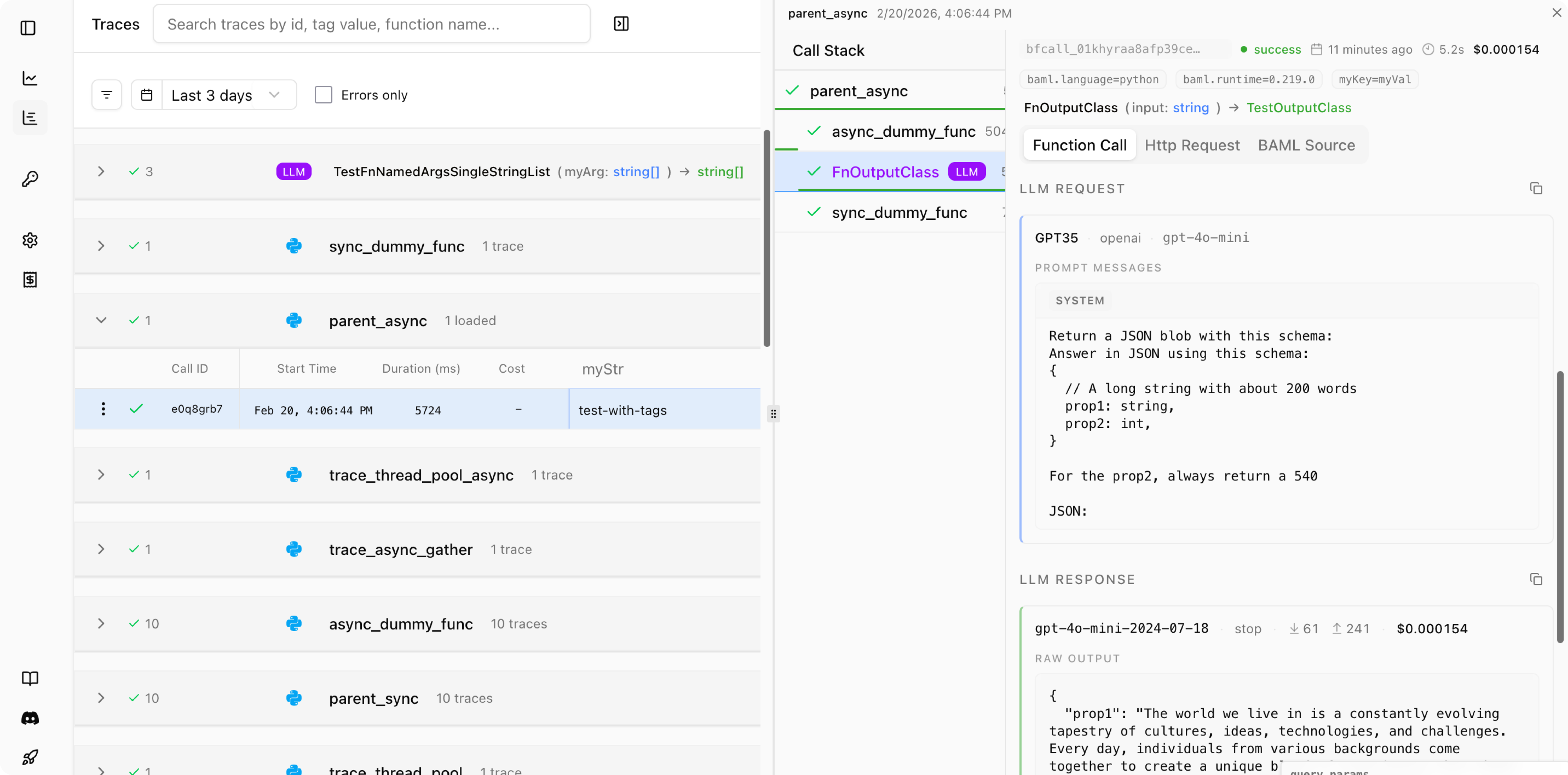
The traces view lets you inspect every LLM call your application makes.
Since Studio has access to the BAML definitions, it can represent your traces as functions, with typed parameters, inputs and outputs. Other observability platforms can only show you raw json blobs, which makes it hard to connect your data to your code.
## Traces
The traces view lets you inspect every LLM call your application makes.
Since Studio has access to the BAML definitions, it can represent your traces as functions, with typed parameters, inputs and outputs. Other observability platforms can only show you raw json blobs, which makes it hard to connect your data to your code.
 ## Tracing Custom Events
BAML allows you to trace any function with the **@trace** decorator.
This will make the function's input and output show up in the Boundary dashboard. This works for any python or Typescript function you define.
BAML LLM functions (or any other function declared in a .baml file) are already traced by default. Logs are only sent to the Dashboard if you setup `BOUNDARY_API_KEY` environment variable.
### Example
In the example below, we trace each of the two functions `pre_process_text` and `full_analysis`:
```python Python
from baml_client import baml
from baml_client.types import Book, AuthorInfo
from baml_client.tracing import trace
# You can also add a custom name with trace(name="my_custom_name")
# By default, we use the function's name.
@trace
def pre_process_text(text):
return text.replace("\n", " ")
@trace
async def full_analysis(book: Book):
sentiment = await baml.ClassifySentiment(
pre_process_text(book.content)
)
book_analysis = await baml.AnalyzeBook(book)
return book_analysis
@trace
async def test_book1():
content = """Before I could reply that he [Gatsby] was my neighbor...
"""
processed_content = pre_process_text(content)
return await full_analysis(
Book(
title="The Great Gatsby",
author=AuthorInfo(firstName="F. Scott", lastName="Fitzgerald"),
content=processed_content,
),
)
```
```typescript TypeScript
import { b } from 'baml_client';
import { Book, AuthorInfo } from 'baml_client/types';
import { traceSync, traceAsync } from 'baml_client/tracing';
const preProcessText = traceSync('preProcessText', function(text: string): Promise {
return text.replace(/\n/g, " ");
});
const fullAnalysis = traceAsync('fullAnalysis', async function(book: Book): Promise {
const sentiment = await b.ClassifySentiment(
preProcessText(book.content)
);
const bookAnalysis = await b.AnalyzeBook(book);
return bookAnalysis;
});
const testBook1 = traceAsync('testBook1', async function(): Promise {
const content = `Before I could reply that he [Gatsby] was my neighbor...`;
const processedContent = preProcessText(content);
return await fullAnalysis(
new Book(
"The Great Gatsby",
new AuthorInfo("F. Scott", "Fitzgerald"),
processedContent
)
);
});
```
```go Go
package main
import (
"context"
"fmt"
b "example.com/baml_client"
)
type AuthorInfo struct {
FirstName string
LastName string
}
func main() {
ctx := context.Background()
// BAML functions are automatically traced when using Boundary Studio
bookSummary, err := b.GenerateBookSummary(
ctx,
"The Great Gatsby",
AuthorInfo{
FirstName: "F. Scott",
LastName: "Fitzgerald",
},
"A classic American novel...",
)
if err != nil {
panic(fmt.Sprintf("Failed to generate book summary: %v", err))
}
fmt.Printf("Book Summary: %s\n", bookSummary)
// Note: Tracing non-BAML functions is not yet supported in Go.
// Custom function tracing will be available in a future release.
// Please contact us if this feature is needed for your use case.
}
```
```text Ruby
Tracing non-baml functions is not yet supported in Ruby.
```
```text REST (OpenAPI)
Tracing non-baml functions is not yet supported in REST (OpenAPI).
```
### Adding custom tags
The dashboard view allows you to see custom tags for each of the function calls. This is useful for adding metadata to your traces and allow you to query your generated logs more easily.
To add a custom tag, you can import **set\_tags(..)** as below:
```python
from baml_client.tracing import set_tags, trace
import typing
@trace
async def pre_process_text(text):
set_tags(userId="1234")
# You can also create a dictionary and pass it in
tags_dict: typing.Dict[str, str] = {"userId": "1234"}
set_tags(**tags_dict) # "**" unpacks the dictionary
return text.replace("\n", " ")
```
### Tags on BAML calls and retrieving them with the Collector
You can also set tags directly on a BAML function call and then retrieve them from the `Collector`. Tags from a parent trace are inherited by the BAML function call and merged with any function-specific tags you pass.
```python
from baml_client import b
from baml_client.tracing import trace, set_tags
from baml_py import Collector
@trace
async def parent_fn(msg: str):
# Set tags on the parent trace (these propagate to child BAML calls)
set_tags(parent_id="p123", run="xyz")
collector = Collector(name="tags-collector")
# You can also set per-call tags via baml_options
await b.TestOpenAIGPT4oMini(
msg,
baml_options={
"collector": collector,
"tags": {"call_id": "first", "version": "v1"},
},
)
# Retrieve tags from the last function log
log = collector.last
assert log is not None
print(log.tags) # {"parent_id": "p123", "run": "xyz", "call_id": "first", "version": "v1"}
```
```typescript
import { b } from "baml_client";
import { Collector } from "@boundaryml/baml";
import { traceAsync, setTags } from "../baml_client/tracing";
const parent = traceAsync("parentTS", async (msg: string) => {
setTags({ parentId: "p123", run: "xyz" });
const collector = new Collector("tags-collector");
await b.TestOpenAIGPT4oMini(msg, {
collector,
tags: { callId: "first", version: "v1" },
});
const log = collector.last!;
const tags = log.tags;
console.log(tags); // { parentId: "p123", run: "xyz", callId: "first", version: "v1" }
});
await parent("hi");
```
```go
package main
import (
"context"
"fmt"
b "example.com/integ-tests/baml_client"
)
func run() error {
ctx := context.Background()
collector, err := b.NewCollector("tags-collector")
if err != nil {
return err
}
// Set per-call tags using WithTags
tags := map[string]string{
"callId": "first",
"version": "v1",
}
_, err = b.TestOpenAIGPT4oMini(ctx, "hello", b.WithCollector(collector), b.WithTags(tags))
if err != nil {
return err
}
logs, err := collector.Logs()
if err != nil {
return err
}
if len(logs) > 0 {
t, err := logs[0].Tags()
if err != nil {
return err
}
fmt.Printf("Tags: %+v\n", t)
}
return nil
}
```
Notes:
* Tags from `set_tags`/`setTags` on a parent `trace` are merged into the BAML function's tags.
* Per-call tags are provided via `baml_options` in Python and the options object in TypeScript; in Go use `b.WithTags(map[string]string)`.
* Retrieve tags from a `FunctionLog` using `log.tags` (Python/TypeScript) or `log.Tags()` (Go).
### Tracing with ThreadPoolExecutor (Python)
When using Python's `concurrent.futures.ThreadPoolExecutor`, traced functions submitted to the thread pool will start with **fresh, independent tracing contexts**. This is by design and differs from async/await execution.
#### Expected Behavior
```python Python
from concurrent.futures import ThreadPoolExecutor
from baml_client.tracing import trace
@trace
def parent_function():
with ThreadPoolExecutor() as executor:
# Submit worker to thread pool
future = executor.submit(worker_function, "data")
result = future.result()
@trace
def worker_function(data):
# This will be an independent root trace
# NOT a child of parent_function
process_data(data)
@trace
def process_data(data):
# This WILL be a child of worker_function
# (same thread execution)
return data.upper()
```
In the trace hierarchy, you'll see:
* `parent_function` as a root trace (depth 1)
* `worker_function` as an **independent root** trace (depth 1) - not a child
* `process_data` as a child of `worker_function` (depth 2)
#### Why This Happens
Python's `contextvars` (used for tracing context) don't automatically propagate to thread pool threads. Each worker thread starts with a fresh context to:
* Avoid complexity with context sharing across threads
* Prevent potential race conditions
* Maintain clear thread boundaries
#### Best Practices
1. **Use async/await for related work**: If you need to maintain parent-child relationships for parallel execution, use `asyncio` instead of thread pools:
```python
@trace
async def parent_async():
# These will maintain parent-child relationship
results = await asyncio.gather(
async_worker("task1"),
async_worker("task2")
)
```
2. **Understand the trace hierarchy**: When debugging, remember that thread pool workers appear as separate root traces in your observability dashboard.
3. **Tags don't propagate**: Tags set in the parent function won't automatically appear in thread pool workers since they have independent contexts.
## Tracing Custom Events
BAML allows you to trace any function with the **@trace** decorator.
This will make the function's input and output show up in the Boundary dashboard. This works for any python or Typescript function you define.
BAML LLM functions (or any other function declared in a .baml file) are already traced by default. Logs are only sent to the Dashboard if you setup `BOUNDARY_API_KEY` environment variable.
### Example
In the example below, we trace each of the two functions `pre_process_text` and `full_analysis`:
```python Python
from baml_client import baml
from baml_client.types import Book, AuthorInfo
from baml_client.tracing import trace
# You can also add a custom name with trace(name="my_custom_name")
# By default, we use the function's name.
@trace
def pre_process_text(text):
return text.replace("\n", " ")
@trace
async def full_analysis(book: Book):
sentiment = await baml.ClassifySentiment(
pre_process_text(book.content)
)
book_analysis = await baml.AnalyzeBook(book)
return book_analysis
@trace
async def test_book1():
content = """Before I could reply that he [Gatsby] was my neighbor...
"""
processed_content = pre_process_text(content)
return await full_analysis(
Book(
title="The Great Gatsby",
author=AuthorInfo(firstName="F. Scott", lastName="Fitzgerald"),
content=processed_content,
),
)
```
```typescript TypeScript
import { b } from 'baml_client';
import { Book, AuthorInfo } from 'baml_client/types';
import { traceSync, traceAsync } from 'baml_client/tracing';
const preProcessText = traceSync('preProcessText', function(text: string): Promise {
return text.replace(/\n/g, " ");
});
const fullAnalysis = traceAsync('fullAnalysis', async function(book: Book): Promise {
const sentiment = await b.ClassifySentiment(
preProcessText(book.content)
);
const bookAnalysis = await b.AnalyzeBook(book);
return bookAnalysis;
});
const testBook1 = traceAsync('testBook1', async function(): Promise {
const content = `Before I could reply that he [Gatsby] was my neighbor...`;
const processedContent = preProcessText(content);
return await fullAnalysis(
new Book(
"The Great Gatsby",
new AuthorInfo("F. Scott", "Fitzgerald"),
processedContent
)
);
});
```
```go Go
package main
import (
"context"
"fmt"
b "example.com/baml_client"
)
type AuthorInfo struct {
FirstName string
LastName string
}
func main() {
ctx := context.Background()
// BAML functions are automatically traced when using Boundary Studio
bookSummary, err := b.GenerateBookSummary(
ctx,
"The Great Gatsby",
AuthorInfo{
FirstName: "F. Scott",
LastName: "Fitzgerald",
},
"A classic American novel...",
)
if err != nil {
panic(fmt.Sprintf("Failed to generate book summary: %v", err))
}
fmt.Printf("Book Summary: %s\n", bookSummary)
// Note: Tracing non-BAML functions is not yet supported in Go.
// Custom function tracing will be available in a future release.
// Please contact us if this feature is needed for your use case.
}
```
```text Ruby
Tracing non-baml functions is not yet supported in Ruby.
```
```text REST (OpenAPI)
Tracing non-baml functions is not yet supported in REST (OpenAPI).
```
### Adding custom tags
The dashboard view allows you to see custom tags for each of the function calls. This is useful for adding metadata to your traces and allow you to query your generated logs more easily.
To add a custom tag, you can import **set\_tags(..)** as below:
```python
from baml_client.tracing import set_tags, trace
import typing
@trace
async def pre_process_text(text):
set_tags(userId="1234")
# You can also create a dictionary and pass it in
tags_dict: typing.Dict[str, str] = {"userId": "1234"}
set_tags(**tags_dict) # "**" unpacks the dictionary
return text.replace("\n", " ")
```
### Tags on BAML calls and retrieving them with the Collector
You can also set tags directly on a BAML function call and then retrieve them from the `Collector`. Tags from a parent trace are inherited by the BAML function call and merged with any function-specific tags you pass.
```python
from baml_client import b
from baml_client.tracing import trace, set_tags
from baml_py import Collector
@trace
async def parent_fn(msg: str):
# Set tags on the parent trace (these propagate to child BAML calls)
set_tags(parent_id="p123", run="xyz")
collector = Collector(name="tags-collector")
# You can also set per-call tags via baml_options
await b.TestOpenAIGPT4oMini(
msg,
baml_options={
"collector": collector,
"tags": {"call_id": "first", "version": "v1"},
},
)
# Retrieve tags from the last function log
log = collector.last
assert log is not None
print(log.tags) # {"parent_id": "p123", "run": "xyz", "call_id": "first", "version": "v1"}
```
```typescript
import { b } from "baml_client";
import { Collector } from "@boundaryml/baml";
import { traceAsync, setTags } from "../baml_client/tracing";
const parent = traceAsync("parentTS", async (msg: string) => {
setTags({ parentId: "p123", run: "xyz" });
const collector = new Collector("tags-collector");
await b.TestOpenAIGPT4oMini(msg, {
collector,
tags: { callId: "first", version: "v1" },
});
const log = collector.last!;
const tags = log.tags;
console.log(tags); // { parentId: "p123", run: "xyz", callId: "first", version: "v1" }
});
await parent("hi");
```
```go
package main
import (
"context"
"fmt"
b "example.com/integ-tests/baml_client"
)
func run() error {
ctx := context.Background()
collector, err := b.NewCollector("tags-collector")
if err != nil {
return err
}
// Set per-call tags using WithTags
tags := map[string]string{
"callId": "first",
"version": "v1",
}
_, err = b.TestOpenAIGPT4oMini(ctx, "hello", b.WithCollector(collector), b.WithTags(tags))
if err != nil {
return err
}
logs, err := collector.Logs()
if err != nil {
return err
}
if len(logs) > 0 {
t, err := logs[0].Tags()
if err != nil {
return err
}
fmt.Printf("Tags: %+v\n", t)
}
return nil
}
```
Notes:
* Tags from `set_tags`/`setTags` on a parent `trace` are merged into the BAML function's tags.
* Per-call tags are provided via `baml_options` in Python and the options object in TypeScript; in Go use `b.WithTags(map[string]string)`.
* Retrieve tags from a `FunctionLog` using `log.tags` (Python/TypeScript) or `log.Tags()` (Go).
### Tracing with ThreadPoolExecutor (Python)
When using Python's `concurrent.futures.ThreadPoolExecutor`, traced functions submitted to the thread pool will start with **fresh, independent tracing contexts**. This is by design and differs from async/await execution.
#### Expected Behavior
```python Python
from concurrent.futures import ThreadPoolExecutor
from baml_client.tracing import trace
@trace
def parent_function():
with ThreadPoolExecutor() as executor:
# Submit worker to thread pool
future = executor.submit(worker_function, "data")
result = future.result()
@trace
def worker_function(data):
# This will be an independent root trace
# NOT a child of parent_function
process_data(data)
@trace
def process_data(data):
# This WILL be a child of worker_function
# (same thread execution)
return data.upper()
```
In the trace hierarchy, you'll see:
* `parent_function` as a root trace (depth 1)
* `worker_function` as an **independent root** trace (depth 1) - not a child
* `process_data` as a child of `worker_function` (depth 2)
#### Why This Happens
Python's `contextvars` (used for tracing context) don't automatically propagate to thread pool threads. Each worker thread starts with a fresh context to:
* Avoid complexity with context sharing across threads
* Prevent potential race conditions
* Maintain clear thread boundaries
#### Best Practices
1. **Use async/await for related work**: If you need to maintain parent-child relationships for parallel execution, use `asyncio` instead of thread pools:
```python
@trace
async def parent_async():
# These will maintain parent-child relationship
results = await asyncio.gather(
async_worker("task1"),
async_worker("task2")
)
```
2. **Understand the trace hierarchy**: When debugging, remember that thread pool workers appear as separate root traces in your observability dashboard.
3. **Tags don't propagate**: Tags set in the parent function won't automatically appear in thread pool workers since they have independent contexts.