> For clean Markdown of any page, append .md to the page URL.
> For a complete documentation index, see https://docs.boundaryml.com/llms.txt.
> For AI client integration (Claude Code, Cursor, etc.), connect to the MCP server at https://docs.boundaryml.com/_mcp/server.
# What is BAML?
The best way to understand BAML and its developer experience is to see it live in a demo (see below).
### Demo video
Here we write a BAML function definition, and then call it from a Python script.
### Examples
* [Interactive NextJS app with streaming](https://baml-examples.vercel.app/examples/stream-object)
* [Starter boilerplates for Python, Typescript, Ruby, etc.](https://github.com/boundaryml/baml-examples)
### High-level Developer Flow
### Write a BAML function definition
```baml main.baml
class WeatherAPI {
city string @description("the user's city")
timeOfDay string @description("As an ISO8601 timestamp")
}
function UseTool(user_message: string) -> WeatherAPI {
client "openai-responses/gpt-5-mini"
prompt #"
Extract.... {# we will explain the rest in the guides #}
"#
}
```
Here you can run tests in the VSCode Playground.
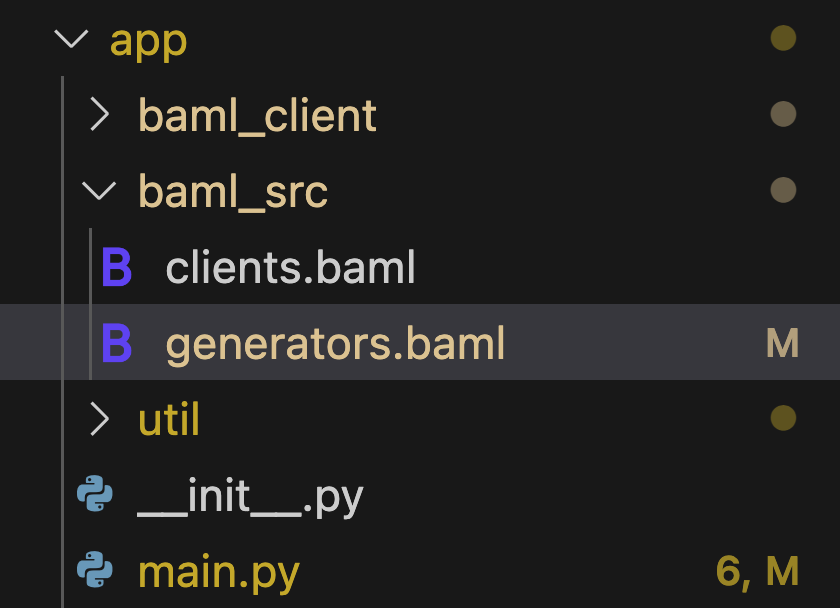
### Generate `baml_client` from those .baml files.
This is auto-generated code with all boilerplate to call the LLM endpoint, parse the output, fix broken JSON, and handle errors.
### Call your function in any language
with type-safety, autocomplete, retry-logic, robust JSON parsing, etc..
```python Python
import asyncio
from baml_client import b
from baml_client.types import WeatherAPI
def main():
weather_info = b.UseTool("What's the weather like in San Francisco?")
print(weather_info)
assert isinstance(weather_info, WeatherAPI)
print(f"City: {weather_info.city}")
print(f"Time of Day: {weather_info.timeOfDay}")
if __name__ == '__main__':
main()
```
```typescript TypeScript
import { b } from './baml_client'
import { WeatherAPI } from './baml_client/types'
import assert from 'assert'
const main = async () => {
const weatherInfo = await b.UseTool("What's the weather like in San Francisco?")
console.log(weatherInfo)
assert(weatherInfo instanceof WeatherAPI)
console.log(`City: ${weatherInfo.city}`)
console.log(`Time of Day: ${weatherInfo.timeOfDay}`)
}
```
```go Go
package main
import (
"context"
"fmt"
b "example.com/myproject/baml_client"
"example.com/myproject/baml_client/types"
)
func main() {
ctx := context.Background()
weatherInfo, err := b.UseTool(ctx, "What's the weather like in San Francisco?")
if err != nil {
panic(err)
}
fmt.Printf("%+v\n", weatherInfo)
fmt.Printf("City: %s\n", weatherInfo.City)
fmt.Printf("Time of Day: %s\n", weatherInfo.TimeOfDay)
}
```
```ruby Ruby
require_relative "baml_client/client"
$b = Baml.Client
def main
weather_info = $b.UseTool(user_message: "What's the weather like in San Francisco?")
puts weather_info
raise unless weather_info.is_a?(Baml::Types::WeatherAPI)
puts "City: #{weather_info.city}"
puts "Time of Day: #{weather_info.timeOfDay}"
end
```
```python Other Languages
# read the installation guide for other languages!
```
Continue on to the [Installation Guides](/guide/installation-language) for your language to setup BAML in a few minutes!
You don't need to migrate 100% of your LLM code to BAML in one go! It works along-side any existing LLM framework.
 ### Call your function in any language
with type-safety, autocomplete, retry-logic, robust JSON parsing, etc..
```python Python
import asyncio
from baml_client import b
from baml_client.types import WeatherAPI
def main():
weather_info = b.UseTool("What's the weather like in San Francisco?")
print(weather_info)
assert isinstance(weather_info, WeatherAPI)
print(f"City: {weather_info.city}")
print(f"Time of Day: {weather_info.timeOfDay}")
if __name__ == '__main__':
main()
```
```typescript TypeScript
import { b } from './baml_client'
import { WeatherAPI } from './baml_client/types'
import assert from 'assert'
const main = async () => {
const weatherInfo = await b.UseTool("What's the weather like in San Francisco?")
console.log(weatherInfo)
assert(weatherInfo instanceof WeatherAPI)
console.log(`City: ${weatherInfo.city}`)
console.log(`Time of Day: ${weatherInfo.timeOfDay}`)
}
```
```go Go
package main
import (
"context"
"fmt"
b "example.com/myproject/baml_client"
"example.com/myproject/baml_client/types"
)
func main() {
ctx := context.Background()
weatherInfo, err := b.UseTool(ctx, "What's the weather like in San Francisco?")
if err != nil {
panic(err)
}
fmt.Printf("%+v\n", weatherInfo)
fmt.Printf("City: %s\n", weatherInfo.City)
fmt.Printf("Time of Day: %s\n", weatherInfo.TimeOfDay)
}
```
```ruby Ruby
require_relative "baml_client/client"
$b = Baml.Client
def main
weather_info = $b.UseTool(user_message: "What's the weather like in San Francisco?")
puts weather_info
raise unless weather_info.is_a?(Baml::Types::WeatherAPI)
puts "City: #{weather_info.city}"
puts "Time of Day: #{weather_info.timeOfDay}"
end
```
```python Other Languages
# read the installation guide for other languages!
```
Continue on to the [Installation Guides](/guide/installation-language) for your language to setup BAML in a few minutes!
You don't need to migrate 100% of your LLM code to BAML in one go! It works along-side any existing LLM framework.
### Call your function in any language
with type-safety, autocomplete, retry-logic, robust JSON parsing, etc..
```python Python
import asyncio
from baml_client import b
from baml_client.types import WeatherAPI
def main():
weather_info = b.UseTool("What's the weather like in San Francisco?")
print(weather_info)
assert isinstance(weather_info, WeatherAPI)
print(f"City: {weather_info.city}")
print(f"Time of Day: {weather_info.timeOfDay}")
if __name__ == '__main__':
main()
```
```typescript TypeScript
import { b } from './baml_client'
import { WeatherAPI } from './baml_client/types'
import assert from 'assert'
const main = async () => {
const weatherInfo = await b.UseTool("What's the weather like in San Francisco?")
console.log(weatherInfo)
assert(weatherInfo instanceof WeatherAPI)
console.log(`City: ${weatherInfo.city}`)
console.log(`Time of Day: ${weatherInfo.timeOfDay}`)
}
```
```go Go
package main
import (
"context"
"fmt"
b "example.com/myproject/baml_client"
"example.com/myproject/baml_client/types"
)
func main() {
ctx := context.Background()
weatherInfo, err := b.UseTool(ctx, "What's the weather like in San Francisco?")
if err != nil {
panic(err)
}
fmt.Printf("%+v\n", weatherInfo)
fmt.Printf("City: %s\n", weatherInfo.City)
fmt.Printf("Time of Day: %s\n", weatherInfo.TimeOfDay)
}
```
```ruby Ruby
require_relative "baml_client/client"
$b = Baml.Client
def main
weather_info = $b.UseTool(user_message: "What's the weather like in San Francisco?")
puts weather_info
raise unless weather_info.is_a?(Baml::Types::WeatherAPI)
puts "City: #{weather_info.city}"
puts "Time of Day: #{weather_info.timeOfDay}"
end
```
```python Other Languages
# read the installation guide for other languages!
```
Continue on to the [Installation Guides](/guide/installation-language) for your language to setup BAML in a few minutes!
You don't need to migrate 100% of your LLM code to BAML in one go! It works along-side any existing LLM framework.