

Building a PII Data Extraction and Scrubbing System with BAML
In this tutorial, you’ll learn how to create a robust PII (Personally Identifiable Information) data extraction and scrubbing system using BAML and GPT-4. By the end, you’ll have a working system that can identify, extract, and scrub various types of PII from text documents.
Prerequisites
- Basic understanding of BAML syntax
- Access to OpenAI API (you’ll need an API key)
Step 1: Define the Data Schema
First, let’s define what our PII data structure should look like. Create a new file called pii_extractor.baml and add the following schema:
This schema defines:
PIIData: A class representing a single piece of PII with its type and valuePIIExtraction: A container class that holds an array of PII data items and a sensitive data flag
Step 2: Create the Extraction Function
Next, let’s create the function that uses GPT-4 to extract PII. Add this to your pii_extractor.baml file:
Let’s break down what this function does:
- Takes a
documentinput as a string - Uses the
gpt-5-minimodel - Provides clear guidelines for PII extraction in the prompt
- Returns a
PIIExtractionobject containing all found PII data
Step 3: Test the Extractor
To ensure our PII extractor works correctly, let’s add some test cases:
This is what it looks like in BAML playground after running the test:
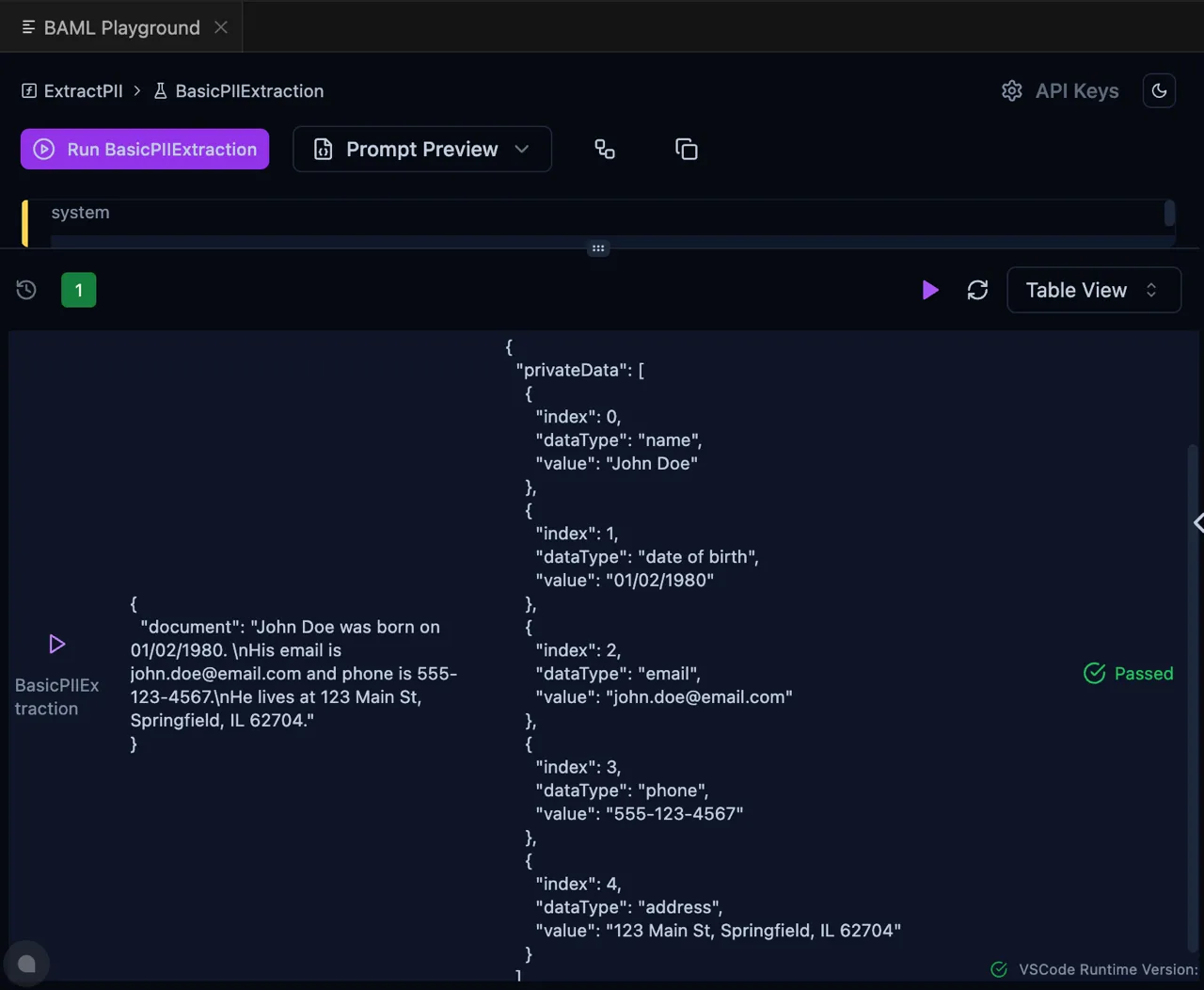
You can try playing with the functions and tests online at https://www.promptfiddle.com/Pii-data-O4PmJ
Step 4: Implementing PII Extraction and Scrubbing
Now you can use the PII extractor to both identify and scrub sensitive information from your documents:
This implementation provides several key features:
- PII Detection: Uses BAML’s ExtractPII function to identify PII
- Data Scrubbing: Replaces PII with descriptive placeholders
- Mapping Preservation: Maintains a mapping of placeholders to original values
- Restoration Capability: Allows restoration of the original text when needed
Example output:
Next Steps
Now that you have a working PII extractor, you can:
- Add more specific PII types to look for
- Implement validation for extracted PII (e.g., email format checking)
- Create a more sophisticated prompt to handle edge cases
- Add error handling for malformed documents
- Integrate with your data privacy compliance system
Enhanced Security: Using Local Models
For organizations handling sensitive data, using cloud-based LLMs like OpenAI’s GPT models might not be suitable due to data privacy concerns. BAML supports using local models, which keeps all PII processing within your infrastructure.
In this example, we’re going to use a Ollama model. For more details on how to use Ollama with BAML, check out this page.
- First, define your local model client in
pii_extractor.baml:
- Update the ExtractPII function to use your local model: