

Prompt Optimization (Beta)
Requires BAML version 0.215.0 or higher. Check your version with baml-cli --version and upgrade if needed.
You can run an automatic Prompt optimization procedure to improve your prompts. Prompt optimization uses the GEPA (Genetic Pareto) algorithm developed by the creators of DSPy.
Optimizing test accuracy
To optimize a prompt, we have to indicate what makes the prompt better or worse. The simplest way to do this is to write BAML Tests that use asserts to define the expected value.
To get started, initialize a new project or navigate to an existing BAML project.
We will use the following code an an example prompt to optimize:
Notice that we have two tests, each with two asserts. The key getting good optimization results is to have lots of examples in the form of tests. Use inputs that are similar to those you would see in your app in production. This example only uses two because we don’t want to bloat the length of this guide.
Let’s optimize the prompt’s ability to pass the tests.
From your project’s root directory (usually the directory
containing your baml_src folder), run baml-cli optimize:
You will need an ANTHROPIC_API_KEY in your environment, because optimization uses Claude models by default.
The --beta flag is required because Prompt Optimization is still
a beta feature. We will stabilize it after implementing more
features and collecting feedback.
While optimization is running, you will see textual user interface that tracks the progress of the optimization.
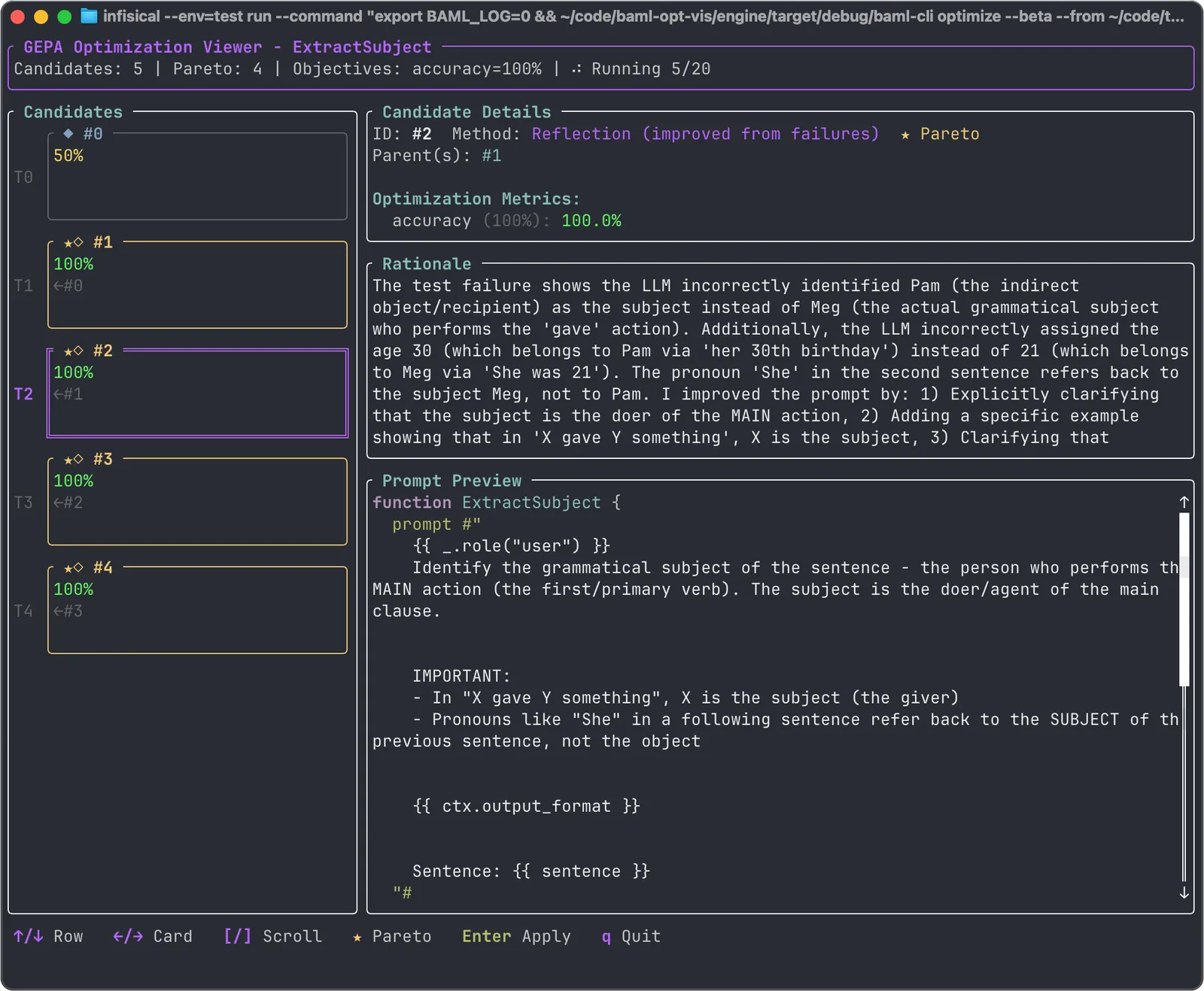
The left panel shows the various candidate prompts and their accuracy scores. The right side shows details about the selected candidate. Select a candidate with the up/down arrows. The selected candidate has an accuracy score, a rationale, and a new prompt. The new prompt is generated by an LLM based on learnings from other prompts. The accuracy score is computed by running the tests using the new prompt. The rationale is the LLM’s explanation of how it created the current candidate prompt given the issues with previous prompts.
Choosing a candidate
At any time during optimization, you can choose a candidate to overwrite your current prompt. Select it with the up/down arrows and press Enter. It’s good practice to keep your prompt versioned, so that you can revert any changes you don’t like.
Optimizing for multiple objectives
Test accuracy is the only thing we optimize by default, but you may want to optimize additional metrics. For instance, you might find that the default optimizer produces accurate results but uses too many input tokens to encode the instructions.
The following optimization will consider inputs tokens more strongly than test accuracy, tending to produce much shorter prompts, and using BAML features that shorten the descriptions of schemas, such as removing descriptions and aliasing fields to abbreviations.
There are 5 builtin measures:
- accuracy: Test pass fraction
- prompt_tokens: Number of tokens in the prompt
- completion_tokens: Number of tokens in the response
- tokens: The sum of prompt and completion tokens
- latency: Wall clock time to complete a response
You can also define custom metrics by using checks. Use the name
of the check as an objective in the weights flag.
In this example, we will use check instead of an assert, so
we can give it a name that we will later use to categorize it as
a custom weight. Again, writing multiple tests using the same check
name would result in more robust optimization for this metric.
Customizing the optimization run
Prompt optimization makes several LLM calls in order to refine the prompt. You can control the cost and the time of optimization by limiting the number of trials in the search and the number of tests.
Optimization runs generally start fresh from your own single
prompt. However, you can resume a prior optimization run,
adding more candidate prompts, using --resume followed by
the name of some prior run. Prior runs are tracked in the
optimization state directory, .baml_optimize.
Customizing the algorithm
The GEPA optimization algorithm is implemented partially as BAML functions, allowing you to customize it. These functions are installed into your environment when you first run prompt optimization. If you want to edit them before optimization starts, you can create first, edit them, and then run optimization:
There are two safe ways to modify gepa.baml:
- Change the
clientfield to use a model other thanopenai/gpt-4. For example,anthropic/claude-opus-4-5. - Add text to the prompts for the functions named
ProposeImprovements,MergeVariants, orAnalyzeFailurePatterns. These three functions constitute the LLM part of the GEPA algorithm.
It is not safe to change the classes or to delete text in gepa.baml
because the internal part of the implementation is not customizable,
and it expects the types to be in their current shape.
gepa.baml is defined like this:
Understanding the Optimization Algorithm
The sections above are enough to get started. But an understanding of the GEPA algorithm can be helpful for getting better results from optimization.
GEPA stands for Genetic Pareto, meaning that it proceeds by tracking the current Pareto frontier, and combining prompts from the frontier to try to extend the frontier. A Pareto frontier prompt is any prompt that is not strictly worse than any other prompt, in the various ways that prompts can be good or bad. For the simple case where only the number of failing tests matters, the Pareto frontier is simply the single prompt with the least failures (or the set of all prompts with the least failures, if there is a tie).
The Pareto frontier begins with only your original prompt, and the algorithm proceeds in a loop until it reaches its exploration budget (maximum number of trials or maximum number of evaluations).
- Evaluate and score the current Pareto frontier (it starts with the initial prompt)
- Propose prompt improvements by iterating on or combining prompts on the frontier
- Reflect on the improved prompts and score them
- Repeat
Limitations
Types
Optimization will modify your types’ descriptions and aliases, but it will not make other changes, such as renaming or adding fields. Modifying your types would require you to modify any application code that uses your generated BAML functions.
Template strings
When optimization runs over your functions, it only looks for the classes and enums already used by that function. The optimizer doesn’t know how to search for template_strings in your codebase that would be helpful in the prompt.
Error types
For the purpose of optimization, all failures are treated equally. If a model is sporadically unavailable and the LLM provider returns 500, this can confuse the algorithm because it will appear that the prompt is at fault for the failure.
Compound optimization
DSPy can optimize multiple prompts at once, when those prompts are part of a larger workflow with workflow-level example input-output pairs. BAML does not officially support workflows yet, so our optimizations are limited to single prompts (single BAML functions).
Future features
Based on user feedback, we are considering several improvements to the prompt optimizer.
Error robustness
We improve our error handling so that spurious errors don’t penalize a good prompt.
Compound optimization
We will support optimizing workflows as soon as we support specifying.
Agentic features
In some circumstances it would be helpful for the reflection steps to be able to run tools, such as fetching specific documentation or rendering the prompt with its inputs to inspect it prior to calling the LLM.
References
GEPA: https://arxiv.org/abs/2507.19457 DSPy: https://dspy.ai/